Boostnote: Accelerate DevOps Collaboration with Document Driven Project Management
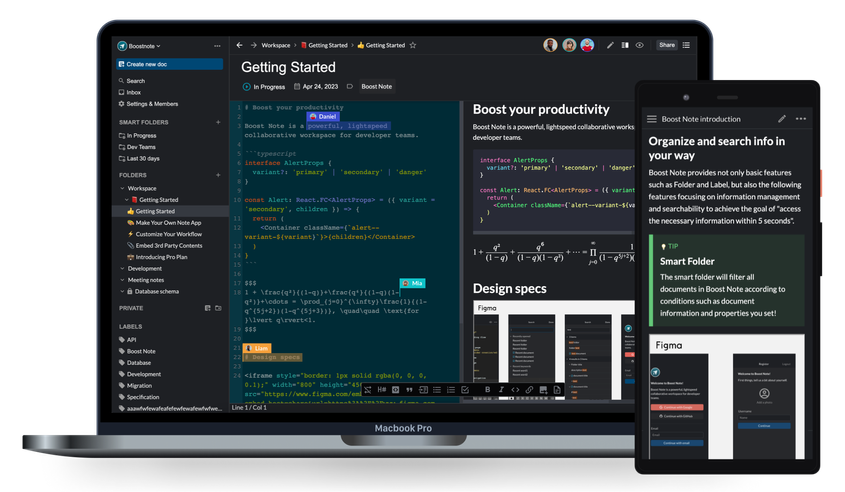
Boostnote is a powerful document-driven project management platform built for remote DevOps teams. Centralize technical documentation, streamline collaboration, and transform knowledge into actionable workflows.
- Free forever plan
- Open source
- No credit card
What is Boost Note
The Modern Knowledge Hub for DevOps Teams
Boostnote is a document-driven project management tool designed specifically for engineering teams who rely on documentation as the backbone of development.
Instead of separating documentation from execution, Boost Note integrates them into one seamless system write technical docs, track tasks, and collaborate around shared knowledge.
- Markdown-based documentation.
- Real-time collaboration for distributed teams.
- Project and knowledge management combined.
- Designed for engineers and DevOps workflows.
Empowering teams with a documentation-first workflow
We believe documentation should not be an afterthought it should be the foundation that drives collaboration, clarity, and innovation across development teams.
Remote Collaboration
Distributed teams collaborate efficiently across modern locations worldwide.
Our Mission
Knowledge Driven
Turn documentation into actionable workflows that guide modern development.
Boostnote was created to eliminate fragmented tools and provide developers with a single platform where documentation and execution coexist.
Open and Flexible
Built with flexibility in mind, integrates seamlessly into modern dev ecosystems.
Key Features
Powerful Features Built for Developers
Document-Driven Workflow
Structure projects around documentation so teams always work with clarity and context.
Markdown-Based Editing
Write documentation effortlessly using powerful Markdown support designed for developers.
Real-Time Collaboration
Work together seamlessly with live editing and shared documentation spaces.
Integrated Project Management
Manage tasks, track progress, and organize workflows directly alongside documentation.
Git and DevOps Integration
Integrate Boost Note with your DevOps ecosystem and version control systems.
Secure Team Workspaces
Create secure team environments where developers can share knowledge safely.
Benefits
Why DevOps Teams DevOps Teams Choose Boostnote
Benefit No: 1
Improve Development Speed
Boost Note connects documentation directly with developer workflows for faster context access. Engineering teams ship features quickly using structured, searchable technical knowledge.
Reduce Communication Overhead
Centralized DevOps documentation creates a reliable single source of truth for teams. Reduce repeated explanations and improve collaboration with organized shared knowledge.
Benefits No: 2
Benefits No: 3
Streamline DevOps Workflows
Combine documentation, tasks, and collaboration inside one unified DevOps workspace. Keep engineering teams aligned across planning, deployment, and iteration workflows
Increase Team Productivity
Structured knowledge management helps developers find information faster and stay focused. Spend less time searching documentation and more time building scalable solutions
Benefits No: 4
Benefits No: 5
Perfect for Remote Teams
Boost Note enables distributed engineering teams to access documentation anytime easily. Keep remote developers aligned, productive, and connected across different locations
Platform Compatibility
Works Across Your Entire Workflow
Windows
Fully compatible with Windows environments used by engineering teams worldwide.
Linux
Optimized for Linux-based developer workflows and infrastructure management.
macOS
Seamlessly integrated with macOS developer environments.
How Boostnote Powers DevOps Teams Works
Create Documentation
Engineers create structured technical documentation using Markdown for clarity and consistency. Teams capture ideas, APIs, and workflows in organized formats that support faster development.
Organize Knowledge
Documentation is structured into projects and shared team workspaces for easy navigation. Centralized knowledge improves collaboration and keeps engineering resources accessible anytime.
Connect Workflows
Tasks, discussions, and collaboration stay directly connected with technical documentation. Teams maintain alignment across development stages using context-driven workflow integration
Execute Faster
Teams execute projects efficiently with complete documentation context and shared visibility. Clear knowledge alignment helps engineers deliver features faster with fewer communication gaps
Troubleshooting & Support
Find quick fixes for common issues with step-by-step troubleshooting guides that help users resolve problems faster and improve workflow.
Unable to Sync Boostnote Workspace Due to Connection or Permission Issues
If your Boostnote workspace is not syncing correctly, check that your internet connection is stable and confirm your account permissions are properly enabled. Reconnecting your session or refreshing the workspace often resolves most Boostnote sync issues quickly.
Fix Boostnote Markdown Rendering Issues for Proper Content Formatting Display
If Markdown formatting appears broken in Boostnote, review your syntax carefully and refresh the workspace to reload content properly. Updating the Boostnote app or clearing cache files can quickly restore accurate Markdown rendering performance.
Resolve Boostnote Team Access Problems by Checking Workspace Roles and Permissions
When team members cannot access shared content in Boostnote, verify workspace permissions, assigned user roles, and invitation status settings. Correct collaboration access ensures smooth teamwork and prevents common Boostnote workspace visibility problems.
Troubleshoot Boostnote Integration Issues by Verifying API Keys and Settings
If integrations are not working correctly in Boostnote, confirm your API keys, tokens, and connection settings are properly configured and active. Reconnecting third-party services usually restores Boostnote integrations and improves workflow connectivity reliability.
FAQ’s
Frequently Asked Questions
What is Boostnote?
Boostnote is a documentation-first project management tool built for developers and DevOps teams. It helps teams create structured Markdown docs, organize workflows, and collaborate efficiently in one workspace.
Who should use Boostnote?
Boostnote is ideal for developers, DevOps engineers, and technical project teams managing documentation workflows. It supports teams that need organized knowledge sharing, version control collaboration, and faster execution across projects.
Is Boostnote free?
Boostnote offers a flexible free plan suitable for individuals and small technical teams getting started. Premium plans unlock advanced collaboration features, workspace controls, and integrations for scaling development workflows.
Is Boostnote open source?
Yes, Boostnote supports open collaboration and encourages community contributions for continuous improvement. Its open ecosystem helps developers customize workflows, extend features, and improve documentation productivity easily.
What makes Boostnote different from other tools?
Boostnote stands out with its documentation-first approach designed specifically for developer-centric workflows. It connects structured knowledge with tasks, discussions, and execution to improve clarity, speed, and team alignment.
Does Boostnote support Markdown?
Yes, Boostnote fully supports Markdown with an advanced editor for writing technical docs, specs, and notes. It also supports diagrams, tables, and developer-friendly formatting.
Can teams collaborate in real time?
Yes, Boostnote enables real-time collaboration where multiple users can edit and comment on documents together. It helps DevOps and remote teams work seamlessly in sync.
Does Boostnote support version control?
Yes, it includes version history that tracks changes and allows rollback to previous document states. This ensures safe editing and proper documentation tracking.
Can Boostnote manage projects?
Yes, Boostnote can manage projects using boards, backlogs, tasks, and structured documentation. It helps teams organize workflows and track progress in one place.
Is Boostnote suitable for DevOps workflows?
Yes, Boostnote is built specifically for DevOps teams with documentation-driven workflows. It connects specs, tasks, and collaboration to improve development speed and clarity.
Does Boostnote work on Windows?
Yes, Boostnote works smoothly on Windows with a dedicated desktop app for writing and managing technical documentation efficiently. It supports Markdown editing, collaboration, and structured workspace organization.
Does it support macOS?
Yes, Boostnote supports macOS through its native desktop version, allowing developers to create and manage project documentation seamlessly. It delivers the same collaboration and Markdown features across Apple devices.
Is Linux supported in Boostnote ?
Yes, Boostnote is available for Linux with multiple installation formats, making it easy for developers to use across distributions. It ensures flexible documentation workflows in open-source development environments.
Can Boostnote run in the cloud?
Yes, Boostnote includes a web app version that runs in the cloud, enabling teams to access documentation from anywhere. This helps remote DevOps teams collaborate in real time without device limitations.
Does Boostnote integrate with Git?
Yes, Boostnote supports developer workflows and integrations through APIs and automation tools like Zapier, helping connect documentation with version-control processes. This improves collaboration between docs and code management systems.
How do I install Boostnote?
You can install Boostnote by downloading its desktop app for Windows, macOS, or Linux, or use the web version instantly. It takes only a few minutes to set up and start writing Markdown documents.
Do I need coding knowledge to use Boostnote?
No, Boostnote does not require coding knowledge for basic use like notes, docs, and tasks. However, developers can use advanced features like Markdown, APIs, and integrations if needed.
Can teams share workspaces?
Yes, Boostnote allows teams to share workspaces where all documents, notes, and projects are centralized. Members can collaborate in real time with full access control.
Is account registration required?
Yes, you need to create an account to access Boostnote’s cloud features and team collaboration tools. It ensures secure access and proper workspace management.
How do I invite team members?
You can invite team members by sending an email invite link directly from your workspace settings. Once accepted, they can join and collaborate in real time.
Why can't I sync my workspace?
Sync issues usually happen due to unstable internet, incorrect account login, or cloud service delays. Make sure your Boostnote app is updated and properly signed in.
Why are documents not rendering?
Documents may not render due to Markdown syntax errors or incomplete loading of workspace data. Refresh the app and check your Markdown formatting for issues.
Why can't team members access files?
This usually occurs due to missing permissions or incorrect workspace sharing settings. Ensure team members are properly invited and assigned access roles.
What if Boostnote crashes?
If Boostnote crashes, restart the app, clear cache, and update to the latest version. Persistent crashes may require reinstalling or checking system compatibility.
Where can I get Boostnote support?
You can get help from Boost Note’s official help center, community forums, or support email. These channels provide troubleshooting guides and direct assistance.
User Reviews